SIM Development
Study guide open beside a laptop showing a structured online unit

Start here

Foundation of SIM

Key question: If your material fails any 'self-' test, the learner has to phone you. Which test does yours fail?

What is a SIM?

A Self-Instructional Material (SIM) is a learning resource designed to guide learners through a topic with minimal direct support from a lecturer. Unlike a set of readings or presentation slides, a SIM contains the instructional guidance needed for learners to know what they are expected to learn, how to engage with the content and how to check their understanding. It typically combines clear explanations, examples, learning activities, feedback and opportunities for self-assessment. In this sense, a SIM acts as a tutorial presence within the material, helping learners move purposefully from one stage of learning to the next.

Slides are speaking prompts. A recorded lecture is a clip. Neither becomes self-instructional until it carries an outcome, an activity and feedback around it.

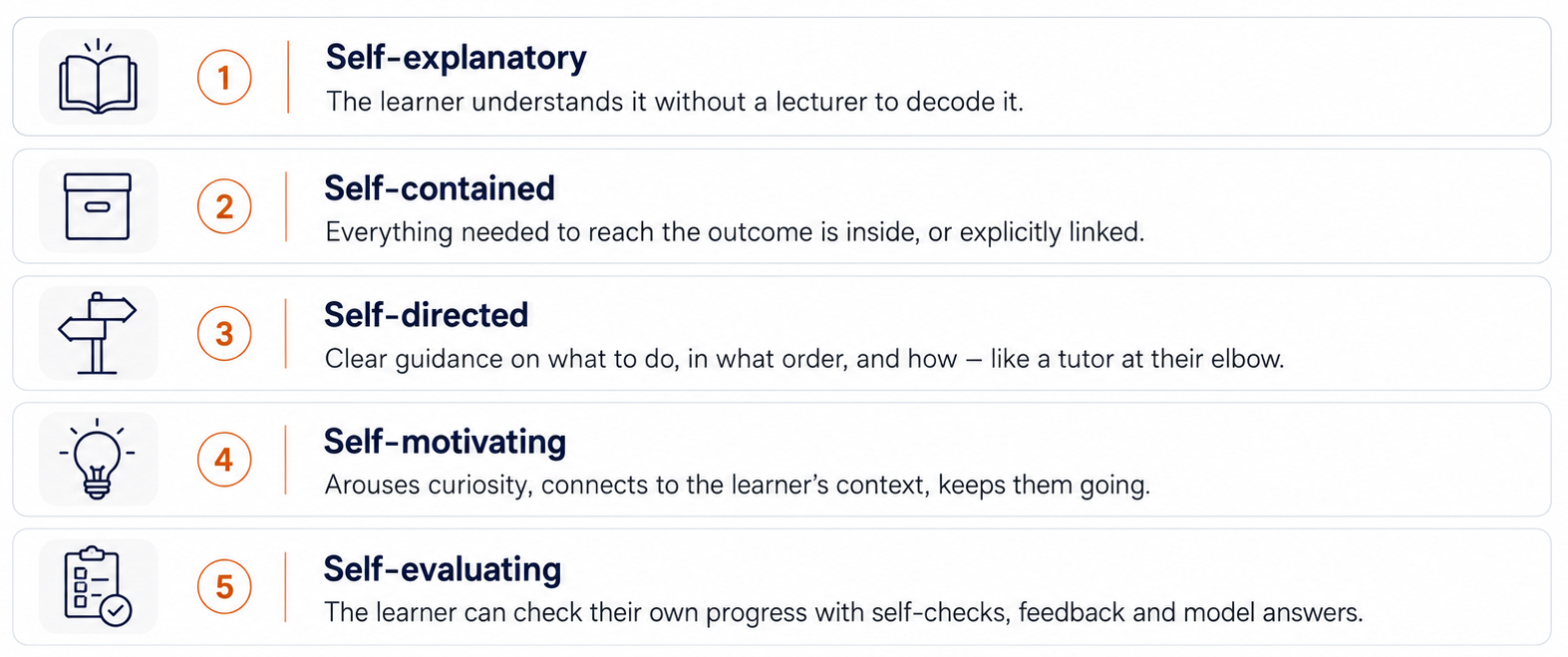
The five “self-” tests

The five self- tests: self-explanatory, self-contained, self-directed, self-motivating and self-evaluating

Drawn from the distance and open learning literature. The whole point of a SIM is that the learner does not have to contact you to make progress.

The five design non-negotiables (any size)

  1. 1. Clear learning outcomes

    The learner knows exactly what they will be able to do.

  2. 2. Conversational, guided presentation

    Rowntree's “tutorial in print” [1], now tutorial in pixels: the material anticipates questions, explains, exemplifies and warns of common errors.

  3. 3. Active responding

    Embedded questions, self-checks, “pause and try this” moments — not passive reading or watching.

  4. 4. Feedback

    Worked answers, model responses, and explanations of why an answer is right or wrong.

  5. 5. Self-pacing and navigation

    The learner controls speed and route; signposting shows where they are and what comes next.

These apply at every size. A 10-minute Nano-SIM still needs an outcome, an activity and feedback.

What digital adds

Do this

  • Instant feedback through auto-marked quizzes and self-checks.
  • Multimedia that shows rather than only tells.
  • Analytics that reveal where learners stall.
  • Adaptivity: different routes for different starting points.
  • Just-in-time access on a phone, between classes.

Never do this

  • Never upload a slide deck and call it a module.
  • Never publish a video with no activity attached — that is a clip, not a SIM.
  • Never leave a self-check without feedback.
  • Never write in textbook voice when the learner is alone with the material.
  • Never assume desktop: most learners open it on a phone.

Types of SIM: three sizes, one job

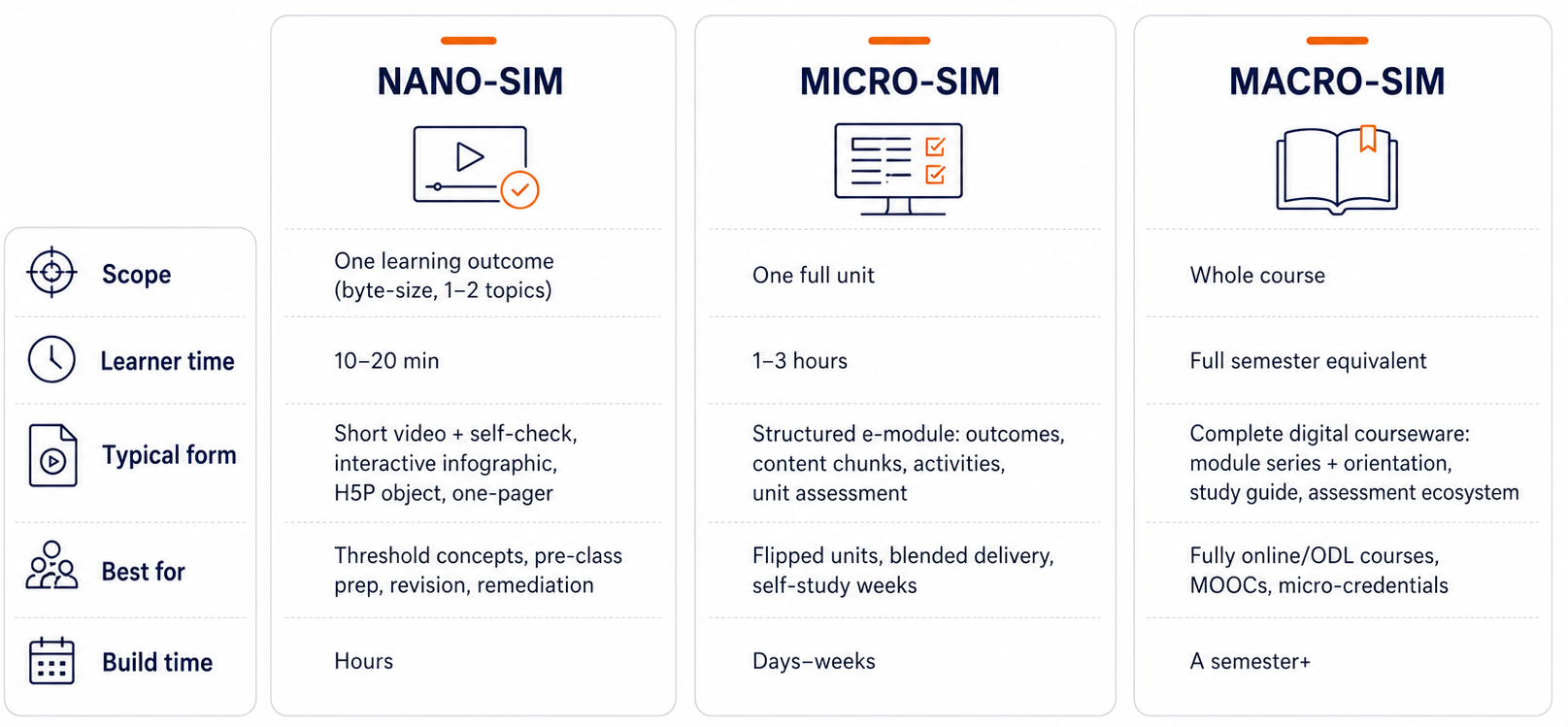
Comparison of Nano-SIM, Micro-SIM and Macro-SIM by scope, learner time, typical form, best for and build time

Key messages

They are nested, not separate

Nano-SIMs are the bricks, Micro-SIMs are the walls, the Macro-SIM is the house. Design Nano-first and you can assemble upwards.

Scope by outcome, not topic count

The clean boundary for a Nano-SIM is one learning outcome, one sitting. Topics vary wildly in size; outcomes don't lie.

It maps onto the literature

What this model calls Nano-SIM, the literature calls microlearning. Micro and Macro territory overlaps with micro-credentials and full ODL courseware. Same ideas — one consistent naming system and a build-up path.

Start small and compound

A lecturer who builds two good Nano-SIMs per unit this semester is halfway to a Micro-SIM next semester.

Build upwards

Design the smallest complete piece first, then assemble it into something bigger.

Nano-SIM → Micro-SIM → Macro-SIM. Building in that order is what makes the model practical for a busy lecturer: nothing is wasted, and every stage is already usable on its own.

Copy this: the audit question set

Five-minute audit of any existing material

Best in Your current course files

Take one material you currently give students and answer:

1. OUTCOME — Can the learner state what they will be able to do after this? (yes / no)
2. VOICE — Does it explain, exemplify and warn of common errors, or just present content?
3. ACTIVITY — Where does the learner DO something?
4. FEEDBACK — What tells them whether they got it right, and why?
5. PACING — Is there a time estimate, a roadmap, and a clear "what's next"?

Any "no" is your redesign list. Fix the cheapest one first: usually the outcome and the self-check.

Most existing material is 80% there. Wrapping content with an outcome, one activity and feedback converts it into a SIM without re-recording anything.

References

  1. [1]Rowntree, D. (1990). Teaching Through Self-Instruction: How to Develop Open Learning Materials (rev. ed.). Kogan Page.
  2. [2]Race, P. (2005). 500 Tips on Open and Online Learning (2nd ed.). London: Routledge.
  3. [3]Wiggins, G., & McTighe, J. (2005). Understanding by Design (2nd ed.). Alexandria, VA: ASCD.
  4. [4]Gagné, R. M., Wager, W. W., Golas, K. C., & Keller, J. M. (2005). Principles of Instructional Design (5th ed.). Belmont, CA: Wadsworth.
  5. [5]Commonwealth of Learning (2005). Creating Learning Materials for Open and Distance Learning: A Handbook for Authors and Instructional Designers. Vancouver: COL.